
ACCESS your IMAGES with the
iVue Patient App
Conveniently access your medical images with IVue.
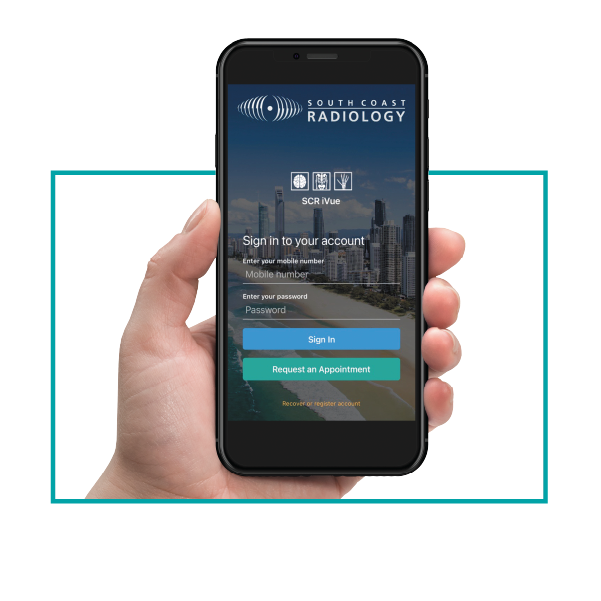
South Coast Radiology offers iVue, our free Patient App and secure digital portal giving you convenient access to your medical imaging performed at South Coast Radiology.
View your images anytime from your smartphone, tablet, or web browser. Share them with your healthcare providers or family, and easily request appointments
when needed.

DOWNLOADS

Download the IQ Vue App via the Apple App Store for IOS devices or from Google Play for Android devices.


OR by:
How does the Patient App work?
After your appointment you will receive an SMS text message asking you to activate your account. Tap on the link in the SMS and follow the account activation process. Once activated, you can securely access all of your images through our iVue App, or online web portal by visiting www.scrivue.com.au.
Account Activation Process
During your appointment, reception staff will ask you for your mobile number (or email address if preferred). Once your appointment has finished you will receive an SMS text message containing your activation link. Click on this link to activate your account and download the SCR iVue Patient App from the Apple App Store or Google Play Store. Alternatively, access your images online by visiting www.scrivue.com.au.
Logging In
Upon your first log in you will be asked to enter your username which is the mobile telephone number or email address you provided the reception staff. You will be asked to set a password during the account activation process – be sure to make this something memorable as this will act as your password for future access to your images.
Viewing your images
Your images will reach your account 7 days after your appointment and are not for diagnostic purposes. Please allow time for your referring practitioner to discuss your results with you directly.
You can easily share your images with family or other health practitioners by viewing the desired study and selecting the ‘Share’ icon. You can also save your images by selecting the ‘Export’ icon.
Accessing your Diagnostics Report
We will send your report directly to your health practitioner as they are in the best position to interpret the results for you. Please make a follow-up appointment with your referring practitioner to take you through the results.
Your report will be available to you via the app 7-14 days after your appointment.
What do you need to know?
LOGGING IN
If you forget your password, please select the ‘Forgot your password?’ option on the login screen. A password reset link will be sent to you.
It could take up to 24 hours to receive the activation SMS/email. Please Note: Your images will reach your account 7 days after your appointment.
If you’ve waited over 7 days and you have not received your text, then please email ivuesupport@scr.com.au.
There are a couple of reasons why you may not have received the activation text message, including:
- We do not have your up-to-date mobile number recorded on your file
- You selected the OPT-OUT on Patient Portal option on your Patient Information and Consent paperwork
- You have previously activated your account.
GENERAL
South Coast Radiology understands the need for high security regarding patient information. All patient information is stored at a highly secure Australian Tier IV Data Centre. iVue is General Data Protection Regulation (GDPR) compliant.
Our images are also available via the web portal. If you have not logged in before you will need to set up your account details by following the link sent to you in the activation email.
No. Once you’ve activated your iVue account you will not get any further text messages. You can login to iVue after each visit to access your results going forward. Your images will appear on the app 7 days after your appointment, and the report will become available to you within 14 days of your appointment.
If you download iVue, the app will provide notifications when a new study has been uploaded to your account. You will also be notified by email.
Please note, if you turn off push notifications in your account settings, you will not receive a notification each time a new study is uploaded to your account.
If you no longer want to receive your results online please let us know by emailing ivuesupport@scr.com.au with your full name and date of birth.
IMAGES
Yes, your images can be saved from the Patient App and web portal by clicking the ‘Export’ option on the image page.
Yes, you can easily share your images by selecting the ‘Share’ icon in the app or via the web portal.
If you’ve waited over 7 days and your images have not become available to you on iVue then please email iVue Support at ivuesupport@scr.com.au
Viewing your images is similar to viewing a standard web page and therefore your images will not take up any storage on your device, unless you choose to export them.
Our IT department can assist you with creating an account. Please contact support at
RESULTS & Follow UP
We will send your report directly to your referring health practitioner as they are in the best position to interpret the results for you. Please make a follow-up appointment with your referring practitioner to take you through the results.
Your report will become available to you on the patient app within 7-14 days following your appointment.
This report can be shared with family or other health practitioners by selecting the ‘Share’ icon on the selected images.
The iVue Patient App makes it easy to start your booking process online. Simply select “Request Appointment” in the app, and you’ll be directed to our secure website booking page where you can upload your referral and submit your preferred appointment date, time, and location. Once your request has been received, one of our dedicated bookings agents will contact you to confirm your appointment details.
Alternatively, you can phone 1300 197 297 to make a booking.
Please email ivuesupport@scr.com.au